Yumeka
Use the avatar’s original Yumeka_Option → Breasts_Size menu. 50% is neutral. At 100%, body Big_1=75 and outfit=100. Big_2 is not animated.
DEVIOUS DEVIL USER GUIDE
Includes a breast-size gimmick that adjusts the body and outfit together. Depending on the avatar, use Devil_BreastShape or the avatar’s original breast-size menu.
The dedicated radial menu also controls sunglasses, transparency adjustments and a looping dance.
unitypackage for your avatar.Breast_Inside / Breast_inside to obtain the neutral shape. Names differ between avatars.GestureManager is for testing in Unity; it is not required to use the outfit.
Every avatar version includes all seven colors listed below.
Choose one color from the Prefab folder and place it directly under your avatar. The default Prefab without a color suffix is Pink.
| Avatar | Breast-size control | Individual setup | Confirmed MA Blendshape Sync entries |
|---|---|---|---|
| Sinano | Devious Devil → Devil_BreastShape | Toe_heels = 100 | hipbig / Stockings3 |
| Eku | body → Breast | Foot_highheels = 100 | Hutomomo_big / Hutomomo_slim |
| Yumeka | Yumeka_Option → Breasts_Size | Foot_heel = 100 | — |
| Siusiu | Devious Devil → Devil_BreastShape | highheels_up_heels = 65 | — |
| NanaseNoir | Avatar’s original breast-size menu | Highheels = 50 | — |
| Chocolat | Devious Devil → Devil_BreastShape | Foot_HighHeel = 100 | Foot_HighHeel01_Devil_Platform_Sandals |
| Milltina | Devious Devil → Devil_BreastShape | Toe_heels = 100 | — |
| Wendy | Avatar’s original breast-size menu | Breasts_closer = 0Toe_heels = 100 | — |
| Urara | Devious Devil → Devil_BreastShape | Toe_Heels = 50 | — |
| Miriam | Devious Devil → Devil_BreastShape | Foot_heel = 100 | — |
| Ramune | バストサイズ | Heel_Middle = 100 | — |
Before using the outfit on Milltina, set the body’s Toe_heels to 100.
Before using the outfit on Ramune, set the body’s Heel_Middle to 100.
Before using the outfit on Miriam, set the body’s Foot_heel to 100.
Before using the outfit on Urara, set the body’s Toe_Heels to 50.
Before using the outfit on Eku, set the body’s Foot_highheels to 100.
Before using the outfit on Wendy, set the body’s Toe_heels to 100.
Before using the outfit on Siusiu, set the body’s highheels_up_heels to 65.
Before using the outfit on NanaseNoir, set the body’s Highheels to 50.
Before using the outfit on Yumeka, set the body’s Foot_heel to 100.
Before using the outfit on Chocolat, set the body’s Foot_HighHeel to 100. MA Blendshape Sync synchronizes this value with the identically named Foot_HighHeel on the outfit’s 01_Devil_Platform_Sandals.
A dash means that an individual value or sync entry is not listed here. It does not mean that the feature is unsupported.
Use the avatar’s original Yumeka_Option → Breasts_Size menu. 50% is neutral. At 100%, body Big_1=75 and outfit=100. Big_2 is not animated.
Use Devil_BreastShape in the outfit menu. 50% is neutral; lower values make the breasts smaller and higher values make them larger.
Use the avatar’s original breast-size menu; the outfit follows it. The outfit’s Devil_BreastShape control is not used.
Use Devil_BreastShape in the outfit menu. 50% is neutral; lower values make the breasts smaller and higher values make them larger.
Use Devil_BreastShape in the outfit menu. 50% is neutral. The bag has no Small shape key, so it follows Big only.
Use the avatar’s original breast-size menu. At 100%, body Breasts_big=50 and outfit=100. Before setup, set the body’s Breasts_closer to 0. The bolero and top also have an initial Breasts_closer value of 0.
Use Devil_BreastShape in the outfit menu. 50% is neutral. The bag has no Small shape key, so it follows Big only.
Miriam uses the dedicated Devil_BreastShape control. Breast enlarges the breasts; this avatar has no Small shape key.
Ramune uses the avatar’s original 「バストサイズ」 menu.
Shape keys in the completed outfits for all 11 avatars, grouped by mesh. Names retain their original spelling, capitalization and symbols.
This list is based on the completed Blender outfits. It includes the two sleeve-adjustment shape keys added to every avatar’s bolero on 2026-10-25. See Avatar settings above for confirmed MA Blendshape Sync targets and recommended values.
Updated: 2026-10-25. 220 outfit meshes and 654 shape keys, excluding Basis. Body meshes, restoration bodies and animation-only meshes are excluded.
Select an avatar to open its list. Search filters mesh and key names for the displayed avatar selection.
| Outfit mesh | Shape-key names |
|---|---|
01_Devil_Leg_Covers |
|
01_Devil_Platform_Sandals |
|
01_Devil_Sheer Bolero |
|
02_Devil_Ankle_Straps |
|
02_Devil_Tail | None |
02_Devil_Waist_Wings | None |
02_Devil_Waist_Wings.silver.ribbon | None |
02_Devil_Wrap_Skirt_Upper | None |
03_Devil_Halter_Top |
|
03_Devil_Wrap_Skirt_Lower | None |
04_Devil_Bikini_Briefs |
|
04_Devil_Horn_Headband |
|
04_Devil_Leg_Harness | None |
04_Devil_Ribbon | None |
04_Devil_Waist_Belt | None |
05_Devil_Crossbody_Bag |
|
05_Devil_Crossbody_Plush |
|
05_Devil_Stockings | None |
05_Devil_Sunglasses |
|
05_Devil_Waist_FlipPhone_Holster | None |
| Outfit mesh | Shape-key names |
|---|---|
01_Devil_Leg_Covers |
|
01_Devil_Platform_Sandals |
|
01_Devil_Sheer Bolero |
|
02_Devil_Ankle_Straps |
|
02_Devil_Tail | None |
02_Devil_Waist_Wings |
|
02_Devil_Waist_Wings.silver.ribbon |
|
02_Devil_Wrap_Skirt_Upper |
|
03_Devil_Halter_Top |
|
03_Devil_Wrap_Skirt_Lower |
|
04_Devil_Bikini_Briefs |
|
04_Devil_Horn_Headband |
|
04_Devil_Leg_Harness |
|
04_Devil_Ribbon | None |
04_Devil_Waist_Belt |
|
05_Devil_Crossbody_Bag |
|
05_Devil_Crossbody_Plush |
|
05_Devil_Stockings |
|
05_Devil_Sunglasses |
|
05_Devil_Waist_FlipPhone_Holster | None |
| Outfit mesh | Shape-key names |
|---|---|
01_Devil_Leg_Covers |
|
01_Devil_Platform_Sandals |
|
01_Devil_Sheer Bolero |
|
02_Devil_Ankle_Straps |
|
02_Devil_Tail | None |
02_Devil_Waist_Wings | None |
02_Devil_Waist_Wings.silver.ribbon | None |
02_Devil_Wrap_Skirt_Upper | None |
03_Devil_Halter_Top |
|
03_Devil_Wrap_Skirt_Lower | None |
04_Devil_Bikini_Briefs |
|
04_Devil_Horn_Headband |
|
04_Devil_Leg_Harness | None |
04_Devil_Ribbon |
|
04_Devil_Waist_Belt | None |
05_Devil_Crossbody_Bag |
|
05_Devil_Crossbody_Plush |
|
05_Devil_Stockings | None |
05_Devil_Sunglasses |
|
05_Devil_Waist_FlipPhone_Holster | None |
| Outfit mesh | Shape-key names |
|---|---|
01_Devil_Leg_Covers |
|
01_Devil_Platform_Sandals |
|
01_Devil_Sheer Bolero |
|
02_Devil_Ankle_Straps |
|
02_Devil_Tail | None |
02_Devil_Waist_Wings | None |
02_Devil_Waist_Wings.silver.ribbon | None |
02_Devil_Wrap_Skirt_Upper | None |
03_Devil_Halter_Top |
|
03_Devil_Wrap_Skirt_Lower | None |
04_Devil_Bikini_Briefs |
|
04_Devil_Horn_Headband |
|
04_Devil_Leg_Harness | None |
04_Devil_Ribbon | None |
04_Devil_Waist_Belt | None |
05_Devil_Crossbody_Bag |
|
05_Devil_Crossbody_Plush |
|
05_Devil_Stockings | None |
05_Devil_Sunglasses |
|
05_Devil_Waist_FlipPhone_Holster |
|
| Outfit mesh | Shape-key names |
|---|---|
01_Devil_Leg_Covers |
|
01_Devil_Platform_Sandals |
|
01_Devil_Sheer Bolero |
|
02_Devil_Ankle_Straps |
|
02_Devil_Tail | None |
02_Devil_Waist_Wings | None |
02_Devil_Waist_Wings.silver.ribbon | None |
02_Devil_Wrap_Skirt_Upper |
|
03_Devil_Halter_Top |
|
03_Devil_Wrap_Skirt_Lower |
|
04_Devil_Bikini_Briefs |
|
04_Devil_Horn_Headband |
|
04_Devil_Leg_Harness |
|
04_Devil_Ribbon |
|
04_Devil_Waist_Belt | None |
05_Devil_Crossbody_Bag |
|
05_Devil_Crossbody_Plush |
|
05_Devil_Stockings |
|
05_Devil_Sunglasses |
|
05_Devil_Waist_FlipPhone_Holster | None |
| Outfit mesh | Shape-key names |
|---|---|
01_Devil_Leg_Covers |
|
01_Devil_Platform_Sandals |
|
01_Devil_Sheer Bolero |
|
02_Devil_Ankle_Straps |
|
02_Devil_Tail | None |
02_Devil_Waist_Wings | None |
02_Devil_Waist_Wings.silver.ribbon | None |
02_Devil_Wrap_Skirt_Upper |
|
03_Devil_Halter_Top |
|
03_Devil_Wrap_Skirt_Lower |
|
04_Devil_Bikini_Briefs |
|
04_Devil_Horn_Headband |
|
04_Devil_Leg_Harness | None |
04_Devil_Ribbon | None |
04_Devil_Waist_Belt | None |
05_Devil_Crossbody_Bag |
|
05_Devil_Crossbody_Plush |
|
05_Devil_Stockings | None |
05_Devil_Sunglasses |
|
05_Devil_Waist_FlipPhone_Holster | None |
| Outfit mesh | Shape-key names |
|---|---|
01_Devil_Leg_Covers |
|
01_Devil_Platform_Sandals |
|
01_Devil_Sheer Bolero |
|
02_Devil_Ankle_Straps |
|
02_Devil_Tail |
|
02_Devil_Waist_Wings |
|
02_Devil_Waist_Wings.silver.ribbon |
|
02_Devil_Wrap_Skirt_Upper |
|
03_Devil_Halter_Top |
|
03_Devil_Wrap_Skirt_Lower |
|
04_Devil_Bikini_Briefs |
|
04_Devil_Horn_Headband |
|
04_Devil_Leg_Harness |
|
04_Devil_Ribbon | None |
04_Devil_Waist_Belt |
|
05_Devil_Crossbody_Bag |
|
05_Devil_Crossbody_Plush |
|
05_Devil_Stockings |
|
05_Devil_Sunglasses |
|
05_Devil_Waist_FlipPhone_Holster | None |
| Outfit mesh | Shape-key names |
|---|---|
01_Devil_Leg_Covers |
|
01_Devil_Platform_Sandals |
|
01_Devil_Sheer Bolero |
|
02_Devil_Ankle_Straps |
|
02_Devil_Tail | None |
02_Devil_Waist_Wings | None |
02_Devil_Waist_Wings.silver.ribbon | None |
02_Devil_Wrap_Skirt_Upper |
|
03_Devil_Halter_Top |
|
03_Devil_Wrap_Skirt_Lower |
|
04_Devil_Bikini_Briefs |
|
04_Devil_Horn_Headband |
|
04_Devil_Leg_Harness |
|
04_Devil_Ribbon | None |
04_Devil_Waist_Belt | None |
05_Devil_Crossbody_Bag |
|
05_Devil_Crossbody_Plush |
|
05_Devil_Stockings |
|
05_Devil_Sunglasses |
|
05_Devil_Waist_FlipPhone_Holster | None |
| Outfit mesh | Shape-key names |
|---|---|
01_Devil_Leg_Covers |
|
01_Devil_Platform_Sandals |
|
01_Devil_Sheer Bolero |
|
02_Devil_Ankle_Straps |
|
02_Devil_Tail | None |
02_Devil_Waist_Wings | None |
02_Devil_Waist_Wings.silver.ribbon | None |
02_Devil_Wrap_Skirt_Upper | None |
03_Devil_Halter_Top |
|
03_Devil_Wrap_Skirt_Lower | None |
04_Devil_Bikini_Briefs | None |
04_Devil_Horn_Headband |
|
04_Devil_Leg_Harness | None |
04_Devil_Ribbon | None |
04_Devil_Waist_Belt |
|
05_Devil_Crossbody_Bag |
|
05_Devil_Crossbody_Plush |
|
05_Devil_Stockings | None |
05_Devil_Sunglasses |
|
05_Devil_Waist_FlipPhone_Holster | None |
| Outfit mesh | Shape-key names |
|---|---|
01_Devil_Leg_Covers |
|
01_Devil_Platform_Sandals |
|
01_Devil_Sheer Bolero |
|
02_Devil_Ankle_Straps |
|
02_Devil_Tail | None |
02_Devil_Waist_Wings |
|
02_Devil_Waist_Wings.silver.ribbon |
|
02_Devil_Wrap_Skirt_Upper |
|
03_Devil_Halter_Top |
|
03_Devil_Wrap_Skirt_Lower |
|
04_Devil_Bikini_Briefs |
|
04_Devil_Horn_Headband |
|
04_Devil_Leg_Harness |
|
04_Devil_Ribbon | None |
04_Devil_Waist_Belt |
|
05_Devil_Crossbody_Bag |
|
05_Devil_Crossbody_Plush |
|
05_Devil_Stockings |
|
05_Devil_Sunglasses |
|
05_Devil_Waist_FlipPhone_Holster | None |
| Outfit mesh | Shape-key names |
|---|---|
01_Devil_Leg_Covers |
|
01_Devil_Platform_Sandals |
|
01_Devil_Sheer Bolero |
|
02_Devil_Ankle_Straps |
|
02_Devil_Tail | None |
02_Devil_Waist_Wings |
|
02_Devil_Waist_Wings.silver.ribbon |
|
02_Devil_Wrap_Skirt_Upper |
|
03_Devil_Halter_Top |
|
03_Devil_Wrap_Skirt_Lower |
|
04_Devil_Bikini_Briefs |
|
04_Devil_Horn_Headband |
|
04_Devil_Leg_Harness |
|
04_Devil_Ribbon | None |
04_Devil_Waist_Belt |
|
05_Devil_Crossbody_Bag |
|
05_Devil_Crossbody_Plush |
|
05_Devil_Stockings |
|
05_Devil_Sunglasses |
|
05_Devil_Waist_FlipPhone_Holster | None |
No matching meshes.
Open the customization menu inside Devious Devil. Starting with Sunglasses at the upper right, clockwise, the six items are:
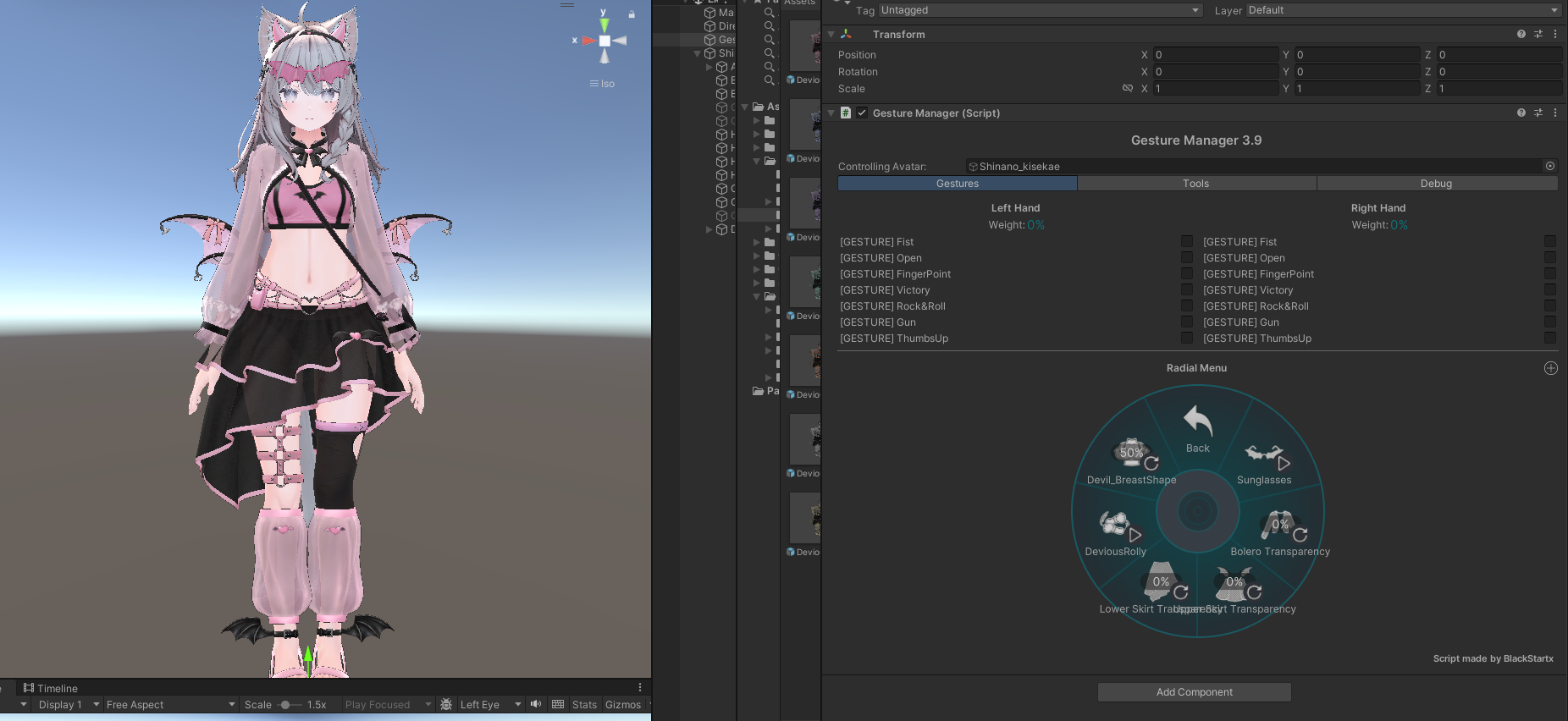
| Order | Control | How to use it |
|---|---|---|
| 1 | Switches the sunglasses on or off each time you select it. | |
| 2 | The default is 50%. Adjust bolero transparency with reference values of 24 at 0%, 34 at 50%, and 43 at 100%. | |
| 3 | Adjusts only the upper skirt. At maximum adjustment, transparency reaches 0: fully opaque. | |
| 4 | Adjusts only the lower skirt. At maximum adjustment, transparency reaches 0: fully opaque. | |
| 5 | Turn on to play the dedicated looping dance; turn off to stop it. | |
| 6 | Shown on the avatars that use this control. 50% is neutral; lower values make the breasts smaller and higher values make them larger. |
The bolero defaults to 50%. The upper and lower skirt controls only reduce transparency. The upper and lower skirt can each reach transparency 0, meaning opaque, not invisible. The radial percentage is the adjustment amount. Menu positions and available items may vary with the avatar and other installed menus.
Use Bolero Transparency in the dedicated menu. The default is 50%. Adjust toward either 0% or 100% from this midpoint.
| Slider | Bolero adjustment value | Position |
|---|---|---|
| 0% | 24 | Minimum |
| 50% | 34 | Default / reference |
| 100% | 43 | Maximum |
From 0–50%, the value changes linearly from 24 to 34. From 50–100%, it changes linearly from 34 to 43. Return the slider to 50% to restore the reference setting.
The slider percentage and the adjustment values 24, 34 and 43 are not actual light-transmission percentages. Setting the slider to 0% does not hide the bolero. The upper- and lower-skirt transparency sliders are separate controls.
The outfit includes animations for the back wings, tail and ankle wings.
Keep these animation settings even if you remove the breast gimmick.
Shinano, Siusiu, Chocolat, Milltina, Urara and Miriam use Devil_BreastShape in the outfit menu.
Eku, Yumeka, NanaseNoir, Wendy and Ramune use the avatar’s original breast-size menu.
Use Devil_BreastShape in the dedicated menu.
50% is neutral. Lower values make the breasts smaller; higher values make them larger.
Use the avatar’s original breast-size menu; the outfit follows it.
Eku uses body → Breast. To avoid duplicate controls, Devil_BreastShape is omitted from this type’s outfit menu.
Other avatars may use names such as Breast or Breasts_Size.
| Radial value | Body | Outfit |
|---|---|---|
| 0% | Small / Flat 100 Big 0 | Small / Flat 75 Big 0 |
| 50% | Small / Flat 0 Big 0 | Small / Flat 0 Big 0 |
| 100% | Big 75 Small / Flat 0 | Big 100 Small / Flat 0 |
The different body and outfit values help reduce clipping. Shape-key names and availability differ between avatars; some shapes or poses may need further adjustment.
To keep a fixed shape, remove the breast gimmick, then set the body and outfit shape keys manually.
The following is a general workflow. Object and FX layer names differ between avatars. The specific Eku and Shinano names below are examples.
DeviousDevil_BreastCorrection; for Shinano, DeviousDevil_BreastCorrection_Sinano. You may delete the entire child if it contains only breast correction. Keep the outfit root and components for other features. Remove the correction components rather than simply deactivating the child.Breast_Inside / Breast_inside. Then set your preferred values under Skinned Mesh Renderer → BlendShapes on the body and outfit. Adjust the breast shape keys that actually exist on the bolero, top and bag. If breast-specific MA Blendshape Sync remains, adjust its source. Remove those breast-only sync entries as well only if you want to set each part independently.Duplicate the Controller assigned under Avatar Descriptor → Playable Layers → FX. Open the copy in the Animator window and remove only the Breast layer. In Eku’s original FX, the State is named BreastSize.
Assign the copied controller to the Avatar Descriptor’s FX slot. Keep all other layers and parameters. The original breast animation would otherwise overwrite your manual values.
Breast_inside at 0. Set Body_base’s Breast_inside to 0 manually if you want to use Big / Small only.Distribution Prefabs with separate body and outfit animation controls allow you to add Pink or Blue to the outfit root name. Do not change internal mesh names, such as 01_Devil_Sheer Bolero, or their hierarchy.
Keep the relative-path root for the outfit’s MA Merge Animator assigned to the outfit root.
These are the previously listed reference measurements, not new measurements of each of the seven additional avatars.
| Item | Value |
|---|---|
| Triangles / Tris | △ 79,766 |
| Skinned Mesh Renderers | 21 |
| Material Slots | 22 |
| Materials | 5 Main (2048px) + 2 Auxiliary |
| Texture Size | 38.1 MB Measured with lilAvatarUtils 2.1.2 |
| Download Size when uploading the outfit alone | Approximately 13 MB |
The auxiliary materials are a 512px tiling material for the stockings’ mesh pattern and a Render Queue adjustment material that shares existing textures.
There are 22 material slots, but only 7 unique materials: 5 main + 2 auxiliary.
There are 21 Skinned Mesh Renderers. The stockings use 2 slots, bringing the total material-slot count to 22.